
Guide for schools and library teachers
What does a school digital library include? How to build an effective digital library
What a school digital library is, how it differs from an e-library, what digital learning materials include, steps to build a digital library for primary and secondary schools, and how to get students and parents using it.
Quick summary
- A school digital library is a collection of books, audiobooks, videos and digital materials that students and teachers can use any time on phones and computers.
- Digital learning materials are more than e-books: they include videos, simulations, 3D models, 360° tours and learning games.
- Building it well starts from real needs, takes care with copyright and is organized by grade and subject.
- A digital library stays alive with regular reading activities and frequent updates.
What is a digital library in a school?
A school digital library brings together learning resources in digital form, such as e-books, audiobooks, videos, lessons and simulations, organized so students and teachers can find, read, watch and listen on phones, computers and classroom screens.
It does not replace the print library. It extends the library beyond its four walls: students read at home, parents listen to audiobooks with their children, and teachers get materials right when planning lessons.
How is a digital library different from an e-library?
In everyday school use, the two terms are often used interchangeably. A simple way to understand them:
E-library
Usually means using software to manage the library: searching the catalogue, lending and returns, reader statistics, even when the books are still printed.
Digital library
Focuses on the resources themselves in digital form: e-books, audiobooks, videos and materials read, watched or heard directly on a device.
Many schools do both
Software for managing print books combined with a digital materials collection, in one search place for students and teachers.
What are digital learning materials? What do they include?
Digital learning materials are teaching and learning resources in digital form, usable on computers, phones and interactive screens. A rich digital library usually has these types:
E-books
Textbooks, reference books, stories and children's books in on-screen form.
Audiobooks
Recorded stories, poems and readings; good for young students, students who struggle with reading and listening time with parents.
Videos and lessons
Lesson videos, experiments, short documentaries and teachers' e-lessons.
Simulations and virtual experiments
Students change parameters, observe results and understand phenomena that are hard to see with the naked eye.
3D models and 360° tours
Rotate and zoom models of the body, molecules and buildings; visit heritage sites and museums right in class.
Practice and learning games
Quizzes, crosswords and short tests with instant feedback for review and self-practice.
What does a school digital library include?
Beyond the materials collection, a well-used digital library usually has all of the following:
Digital resource collection
E-books, audiobooks, videos, simulations and 3D models, selected to suit each age group.
Classification and search
Organized by grade, subject and topic, with a search box and clear labels for quick finding.
Access methods
Links, QR codes, student accounts or shared class accounts, all working on phones.
The school's own corner
Work by teachers and students, and school and local history materials that outside collections do not have.
A person in charge
A library teacher or group of teachers responsible for selecting, updating and helping students.
Usage statistics
Views, listens and most-used materials show what to add next.
Steps to build a digital library in a school
Step 1: Identify needs
Ask teachers, students and parents what they need: audiobooks for young students, review materials, simulations for science.
Step 2: Choose content sources
Start with existing free collections, then add work by teachers and students and the school's own materials.
Step 3: Take care with copyright
Upload only materials that may be shared; for outside resources, prefer linking to the original source rather than copying.
Step 4: Organize by grade and subject
Each grade and subject has its own section; materials are tagged by topic and lesson so teachers can use them when planning.
Step 5: Choose how to access it
QR codes in classrooms, the library and notice boards; accounts when reading needs tracking; make sure it opens on phones.
Step 6: Trial, then expand
Try it with a few classes, listen to feedback, adjust the organization, then open it to the whole school.
What should a primary school digital library prioritize?
Audiobooks and picture stories
Young students love being read to; audiobooks help them get to know books before they read fluently.
Simple, picture-rich interface
Large icons, little text, grouped by familiar topics such as animals, family and home town.
Visual learning materials
Simple simulations, 3D models and 360° tours for science, history and geography lessons.
Parents alongside
Send QR codes for audiobooks and stories so parents can read and listen with their children at home.
Getting students and parents to use the digital library
Reading challenges
Monthly or termly challenges where students log books read or heard; the most active classes are recognized.
QR codes in class reading corners
Each reading corner has a few QR codes to audiobooks, stories and videos, changed with the weekly theme.
Audiobook listening time
At the start of the day or in homeroom, the class listens to a story and then discusses it.
Students recommend books
Students film short videos about a book they love, added to the digital library for others to watch.
Link it to lessons
Teachers assign videos, virtual experiments or review games from the library before or after class.
Updating and maintaining the digital library
A fixed update schedule
Add new materials each month based on topics, holidays and upcoming lessons.
Check links and QR codes
Test materials regularly; replace broken links and removed videos right away.
Use the data
See which materials are used most and least to add exactly what students need.
Teachers contribute
Each subject team shares its best materials; credit contributors to encourage more.
Listen to students
A suggestion box or short survey about books and topics they would like to see.
Common mistakes when building a digital library
Lots of materials, hard to find
Bulk uploads with no classification leave students unsure where to start.
Ignoring copyright
Uploading scans of printed books or re-uploaded videos without permission to share.
Works only on computers
Heavy files and required software make it hard for students to use on phones at home.
Built but unused
Without reading activities and a person in charge, the digital library is gradually forgotten.
Frequently asked questions
What does a primary school digital library need?
Audiobooks, picture stories, videos and visual materials such as simulations and 3D models, organized by grade and familiar topics, with QR code access so students and parents can use it easily on phones.
What are digital learning materials?
They are teaching and learning resources in digital form, including e-books, audiobooks, videos, e-lessons, simulations, 3D models, 360° tours, practice exercises and learning games.
How is an e-library different from a digital library?
Simply put, an e-library focuses on using software to manage the library, while a digital library focuses on resources in digital form. Many schools combine both in one search place.
Does a digital library need expensive software?
Not necessarily. You can start with free 3D and simulation collections, a page organized by grade and QR codes, then expand as needs grow.
Can we upload scanned books to the school's digital library?
Only when the material may be shared. For books and videos from others, link to the official source or ask permission before uploading.
 Digital teaching equipment
Sample product
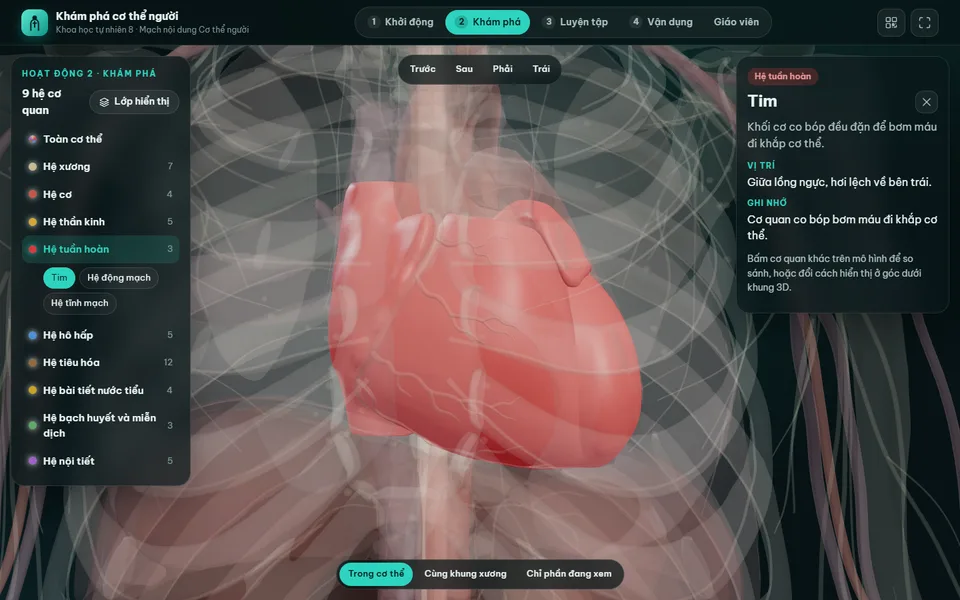
Digital lesson: Explore the human body (3D model)
Try a similar digital product live on a computer or phone. Real products are built around your own idea.
View demo (opens in a new tab)Need to build a digital library for your school?
We suggest ideas and work with you to build digital products: digital library portals, audiobooks, videos, simulations, 3D models, learning games and QR codes, usually within 3–10 days.
Related articles
See all articlesDigital teaching equipment
What digital teaching equipment is, how it differs from digital learning materials and what forms it takes; examples for preschool, primary grades 1–5, maths, science, English, history and geography, how to use it in class and steps to make a contest entry.
ReadVirtual museums in teaching
What virtual museums and exhibitions are, their types and benefits for teaching history, geography, literature, the arts and STEM; steps to make a 3D virtual museum, free tools, lesson ideas and how to let students create their own exhibitions.
ReadHo Chi Minh Cultural Space
Which items make up a Ho Chi Minh Cultural Space, the steps to build one in schools, kindergartens, neighborhoods and agencies, how to take it online with QR codes, online bookshelves and 3D exhibitions, and how to present it convincingly.
Read