
Guide for preschool, primary and secondary teachers
What is digital teaching equipment and what does it include? Examples by subject and contest ideas
What digital teaching equipment is, how it differs from digital learning materials and what forms it takes; examples for preschool, primary grades 1–5, maths, science, English, history and geography, how to use it in class and steps to make a contest entry.
Quick summary
- Digital teaching equipment is teaching equipment built, designed or digitized for full or partial use in a digital environment.
- Common forms: digitized pictures and videos, simulations and virtual labs, 3D models, 360° tours, games and quizzes.
- Good equipment lets students operate, predict, test and explain, not just watch.
- A contest entry belongs to the teacher's own idea and content; technical parts can be supported where the rules allow.
What is digital teaching equipment?
As commonly understood, digital teaching equipment is teaching equipment built, designed or digitized for full or partial use in a digital environment to serve teaching and learning. Put simply, it is pictures, models, lab apparatus, maps and so on, but in digital form, opened on a computer, projector, TV or phone.
For example, instead of a plastic model set, the teacher has a rotatable 3D model; instead of an experiment that is hard or dangerous to run, students do a virtual experiment and change parameters to see the result. What they share is that students see more clearly, try many times and explore on their own.
How is digital teaching equipment different from digital learning materials?
The two terms are often mixed up. Digital learning materials is a broad name for any learning resource in digital form. Digital teaching equipment stresses the role of a “tool”: something teachers and students use to observe, operate and experiment with during a lesson.
Digital learning materials: to read, watch, listen
E-lectures, e-books, lesson videos, exercises and tests in digital form.
Digital teaching equipment: to observe and operate
3D models, virtual experiments, interactive maps, animated pictures that replace or supplement physical equipment on the subject's list.
The boundary is not rigid
A simulation can be both digital teaching equipment and part of digital learning materials. For a contest, read how the organizers define it to choose the right kind of product.
A question to check yourself
Does your product replace or improve on a piece of equipment, picture, model or experiment in the lesson? If so, it is heading towards digital teaching equipment.
What does digital teaching equipment include?
It can be grouped into five common types, from simple to complex:
1. Digitized pictures, videos and audio
Wall charts, maps and diagrams digitized in sharp detail, zoomable and markable, with narration or sound.
2. Simulations and virtual labs
Students change parameters and observe the result: circuits, motion, chemical reactions, the water cycle, photosynthesis.
3. 3D models
Objects that rotate, zoom and separate into layers: solids, skeletons, cells, molecules, artefacts, buildings.
4. 360° tours and virtual reality
Take students to heritage sites, museums, landscapes and labs the class cannot visit in person.
5. Interactive games and quizzes
Drag and drop, puzzles, crosswords and questions with instant feedback, tied to the lesson content.
Examples of digital teaching equipment for preschool and primary (grades 1 to 5)
Preschool: the world around us
Animated pictures of animals, plants and vehicles with sounds and spoken names; drag-and-drop sorting games on the class TV.
Grades 1 and 2: letters and counting
Interactive letter and number cards, virtual counting sticks to split and combine numbers, a virtual clock to learn to tell time.
Grade 3: geometry and measurement
Flat shapes that can be combined and cut on screen; virtual scales, rulers and jugs so students measure and compare.
Grades 4 and 5: fractions and solids
Partition models to compare fractions; cuboids and cubes that unfold into nets to work out area and volume.
Science, Nature and Society
Simulations of germination, plant parts, the water cycle, conductors and insulators.
History and Geography in grades 4 and 5
Interactive regional maps, 360° tours of heritage sites, 3D models of local artefacts.
Examples of digital teaching equipment by subject in secondary school
Digital teaching equipment for maths
Dynamic geometry to drag points and observe invariant properties; rotatable solid figures; function graphs that change with parameters.
Natural science and physics
Virtual experiments on force, motion, light and circuits; measure and record data right in the simulation.
Chemistry and biology
3D models of molecules, crystal lattices, cells and organs; safe simulated reactions instead of toxic experiments.
Digital teaching equipment for English
Word cards with pronunciation, situation pictures that play a dialogue when tapped, word and sentence matching games, 360° tours with English narration.
History and geography
Step-by-step battle maps, layered digital maps, virtual museums, 3D terrain models.
Technology, IT and the arts
3D machine parts that can be taken apart virtually, algorithm simulations, virtual galleries of student work.
How to use digital teaching equipment effectively in class
Digital equipment only works when students think and act, not just sit and watch. A simple routine is predict – test – explain:
Predict
Ask a question before opening the equipment: “If the slope gets steeper, will the object slide faster or slower?” Students write down their prediction.
Test
Students or groups operate the simulation or model, change one factor at a time and record the results.
Explain
Compare the results with the prediction and draw a conclusion in their own words; the teacher consolidates the knowledge.
Combine with real equipment
Where possible, do the real experiment after the virtual one so students see how the two complement each other.
Have a backup plan
Open everything before class and check the network and screen; keep screenshots or worksheets in case something fails.
Contest entry ideas for digital teaching equipment in primary and lower secondary
There are contests on building digital teaching equipment for teachers. Each contest, and each round, may have different rules, so read the current rules carefully before you start. Some directions for ideas:
Digitize equipment that is scarce or fragile
Pick a picture, model or tool from the lesson that the school lacks or that breaks easily, and make a digital version students can operate.
Experiments that are hard to run in class
Dangerous, chemical-hungry, too fast or too slow experiments turned into simulations you can pause, rewind and adjust.
Content that is hard to picture
Solid figures, internal structures, microscopic processes and historical events over time made into 3D models or animated maps.
Linked to the locality
Local heritage sites, craft villages and landscapes made into 360° tours or 3D models for local history and geography lessons.
An equipment set for a whole topic
A chain of small tools for one topic: digitized pictures, a simulation, a review game and a worksheet with a QR code.
How to make digital teaching equipment: steps for teachers
A contest entry must be built and owned by the teacher: the idea, the content, the teaching script and how it is used in class. For the technical side, use existing tools or get support where the rules allow.
Step 1: Choose the lesson and the problem
Identify the lesson, its learning outcomes and the specific difficulty: what students find hard to picture, what physical equipment is missing.
Step 2: Write the teaching script
What students will see, click and change, and which questions they will answer; sketch each screen on paper.
Step 3: Prepare accurate content
Check knowledge, figures and images; use your own photos or sources you are allowed to use.
Step 4: Build the product
Use presentation software, game makers or free simulation tools, or get a technical provider to build the 3D, 360° or programmed parts.
Step 5: Trial and revise
Use it in a real class, collect feedback from students and colleagues; fix awkward spots, small text and clumsy steps.
Step 6: Complete the submission
A concise description, user guide, a video of the lesson, a link and QR code as the rules require.
Frequently asked questions
What is digital teaching equipment?
It is teaching equipment built, designed or digitized for full or partial use in a digital environment, such as 3D models, virtual experiments, digitized pictures, 360° tours and learning games.
Is an e-lecture digital teaching equipment?
E-lectures are usually counted as digital learning materials. A simulation, model or virtual experiment used in the lecture is closer to digital teaching equipment. For a contest, follow the definition in the rules.
Can teachers who cannot code make digital teaching equipment?
Yes. Much equipment can be made with presentation software, game makers and 360° photos taken on a phone. Harder parts such as 3D models or programmed simulations can get technical support where the rules allow.
What digital teaching equipment suits grade 1?
Favour large pictures, clear colours, sound and simple tap or drag actions: letter cards, virtual counting sticks, a virtual clock, puzzle games based on the lesson.
What does a digital teaching equipment contest entry need?
Usually a working product, a description, a user guide and evidence of classroom use. The exact list depends on each contest's rules, so read them carefully before you start.
 Digital teaching equipment
Sample product
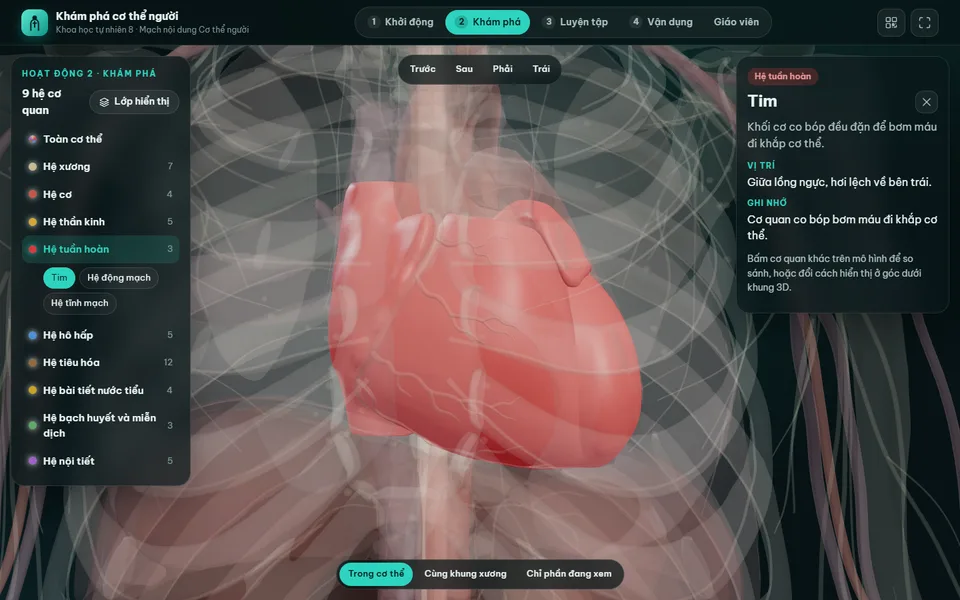
Digital lesson: Explore the human body (3D model)
Try a similar digital product live on a computer or phone. Real products are built around your own idea.
View demo (opens in a new tab)Need technical support for digital teaching equipment?
We suggest ideas and work with you to build the technical parts of digital products: 3D models, simulations, 360° tours, learning games and QR codes, usually within 3–10 days.
Related articles
See all articlesVirtual museums in teaching
What virtual museums and exhibitions are, their types and benefits for teaching history, geography, literature, the arts and STEM; steps to make a 3D virtual museum, free tools, lesson ideas and how to let students create their own exhibitions.
ReadAI in teaching
What AI can do for teachers: prepare materials, differentiate exercises, create questions, give feedback, answer students as an assistant; ideas by subject and level, responsible AI use and steps to build a small AI product for a contest.
ReadMaking a digital entry
What a digitised contest entry means, which format suits STEM, AI, culture or initiative contests; how to prepare content, make the product work well on phones, submit it by link and QR code and present it to the judges.
Read