
Guide for teachers, officials and students
How to make a digital contest entry: choose a format, prepare content, submit by link and QR code
What a digitised contest entry means, which format suits STEM, AI, culture or initiative contests; how to prepare content, make the product work well on phones, submit it by link and QR code and present it to the judges.
Quick summary
- A digital entry is one that judges can open and experience on a phone or computer, through a link or QR code.
- Choose the format by content: a 3D exhibition for history and culture, a simulation for STEM, an AI assistant when the topic needs Q&A.
- Content decides quality: clear photos, short text, credited sources and consent when using images of other people.
- Before submitting, test on several phones, check the link and QR code and prepare a short presentation.
What does it mean for a contest entry to be digitised?
Many contests now require entries to be digitised, meaning the entry exists in digital form so judges can view, listen to and interact with it on a phone or computer. It may be a video, a website, a 3D exhibition room, a game or an AI assistant. Entrants usually submit a link or QR code instead of, or alongside, a paper file.
Digitising is not just photographing your work and putting it online. A good digital entry does what paper cannot: rotate a model, walk through a space, tap to hear narration, play to check understanding. Each contest may set different rules on format, file size and submission, so read the rules carefully before you start.
Common formats for digital contest entries
Each format suits a type of content. Knowing the strengths of each helps you choose correctly from the start:
3D exhibitions, 360° tours
A virtual gallery or panoramic photos where viewers move around and tap each object or document. Suits history, culture, heritage and school-tradition topics.
Simulations, 3D models
Viewers change parameters and see the result, or rotate a model to see its structure. Suits science, engineering and STEM entries.
Learning games, quizzes
Questions, scenarios and tasks with scoring and instant feedback. Suits revision, awareness-raising and life-skills topics.
Websites, portals
One place for all of a project's content: introduction, materials, activities, results. Suits initiatives and projects with many parts.
AI assistants, chatbots
Answer questions based on the materials you prepare. Suits topics with many questions, such as subject knowledge, study guidance or common procedures.
Video, digital maps, audiobooks, QR codes
Short story videos, maps marking places, stories read as audio, QR codes attached to real objects. Use them alone or as supporting parts.
Choosing the right entry format for each type of contest
No single format is best for every contest. Start with the question: what do judges need to see to understand my entry? Some suggestions:
History, culture and tradition contests
A 3D exhibition or 360° tour arranges materials into a space with a route and a story. Add voice narration so viewers can follow easily.
STEM entries
A simulation or 3D model shows how it works, with photos and video of the real product and its testing. Judges need to see both the idea and how you verified it.
AI entries
Explain what the AI does, which data it uses and where its limits are. An assistant that answers within your materials convinces more than a chatbot that answers everything.
Initiative and solution contests
A website or tool that real users have tried, with before-and-after figures. Here the digital product is evidence that the initiative works.
Awareness and communication contests
Short videos, quizzes and QR notice boards that are easy to share and measurable in views and participation. The shorter the message, the further it spreads.
When torn between several formats
Pick one main product and do it really well; other formats are only supporting parts. One tidy, smooth product beats many half-finished ones.
Preparing content before building the entry
The technical part is only the frame. What judges remember is the content, so prepare it carefully first:
Outline or script
Write down what viewers see first, what comes next and where it ends. A one-page outline makes building faster with fewer revisions.
Sharp images
Shoot in good light, without blur or tilt; scan old documents at high resolution. Name files in order so they are easy to arrange.
Short, readable text
Each item gets a title and a few lines of introduction. Longer parts should become audio narration or a read-more page.
Credit your sources
State where each photo, article and figure comes from. Prefer official sources and your own unit's materials.
Ask permission for other people's images
Photos of students, residents or other people's work need consent. For young students, ask the parents.
Materials for an AI assistant
If you build a chatbot, prepare common questions and correct answers in advance. This decides whether the assistant answers accurately.
Making the entry work well on phones
Most judges will open the product on a phone, sometimes right in a meeting. A few things to watch:
No installation, no login
Tap the link or scan the code and it opens straight away. Every extra step is a reason for a judge to skip it.
Fast loading
Compress images and video to just sharp enough; avoid a long wait on the first screen. If the content is heavy, show the introduction first.
Large text, easy buttons
Readable without zooming, buttons sized for a finger. Check it in both landscape and portrait.
Test on several devices and networks
Try it on Android, iPhone and a computer, on both Wi-Fi and 4G. Ask someone who knows nothing about the product to try it.
Instructions on the first screen
One short line such as “Drag to rotate” or “Tap an object to hear the narration”. Judges should not have to guess how to use it.
Submitting the entry by link and QR code
The exact submission method is set by each contest's rules. Whatever the method, prepare the link and QR code carefully:
A stable link
Use an address that stays the same throughout judging and afterwards. Avoid temporary links or links that require access requests.
A clear QR code with a text link
Print the code large enough with white space around it, and write the link below so anyone who cannot scan can type it. Scan it after printing.
Put the link where it is easy to see
On the cover, at the top of the written description and in the online submission, so judges do not have to search.
Public viewing
Open it in a private browser window or on someone else's device to be sure outsiders can view it.
A backup
Record a short screen video of the product, in case the connection is weak or the rules ask for an attached file.
Keep it running during judging
Do not make major changes or move the address while judging is under way. If you must update, note the date and what changed.
Checklist before submitting your entry
Follows the rules
Right topic, format, file size, deadline and submission method required by the contest.
Accurate content
Re-read names, places, dates and figures; fix every typo.
Every button and link works
Tap every object, every question and every internal link in the product.
Clear audio
Clear narration, moderate background music and a mute button for viewers in busy places.
Author details in the right place
Name and unit where the rules allow; some contests require no names on the product.
A second person checks it
Ask a colleague or student to use it from start to finish and give honest feedback.
Common mistakes when making a contest entry
Choosing the format before the content
Going 3D because it looks nice, then trying to fit content in. The result is often disjointed, with no running story.
Too much text
Pasting a whole long article onto the screen. Judges reading on a phone will soon skip it.
Testing only on your own device
It runs fine on yours, but on another phone the layout breaks or it does not load.
Expired or locked links
Temporary share links, folders that need permission, trial domains that expire in the middle of judging.
Images with unclear sources
Photos taken from the internet without credit, or images of people without permission, can lower your score or cause trouble.
Leaving it to the last minute
No time left to fix bugs, test devices or print QR codes. Aim to finish a few days before the deadline.
Presenting your entry to the judges
Many contests have a presentation round, or judges have only a few minutes per entry. Prepare so they understand quickly:
Open with the problem
One or two sentences on what your entry solves and for whom. Only then introduce the product.
Let judges use it themselves
Hand over the QR code so they open it on their own phones, instead of only watching you click on a projector.
Follow one main path
Prepare two or three highlights to guide judges to; you do not need to show everything.
Be clear about your part
Who did the idea, content and materials; which tools were used for the technical part, and who helped. Transparency builds trust.
Show real usage
How many students, colleagues or residents tried it and what they said. Photos of a real session carry a lot of weight.
Frequently asked questions
What does it mean for a contest entry to be digitised?
It is an entry in digital form that judges can view or interact with on a phone or computer, usually submitted by link or QR code. The exact format and submission method follow each contest's rules.
Which format should I choose for a STEM entry?
A simulation or 3D model to explain the principle, with photos and video of the real product and its testing. Judges need to see both the idea and evidence that it works.
Do I have to code an AI entry myself?
Not necessarily, unless the rules require it. What matters is defining the problem well, preparing data, checking the answers and explaining what the AI does.
What should I watch for when submitting by QR code?
Print the code large enough, add the link as text, scan it after printing and check the link opens on someone else's device without logging in.
Can I get help with the technical side of my entry?
It depends on each contest's rules. The idea and content should be yours; if you get technical help, declare it when the rules require and know the product well enough to present it yourself.
How long does it take to make a digital entry?
It depends on the format and how ready your content is. Once photos, text and materials are in place, building is much faster; start early to leave time for testing and fixes.
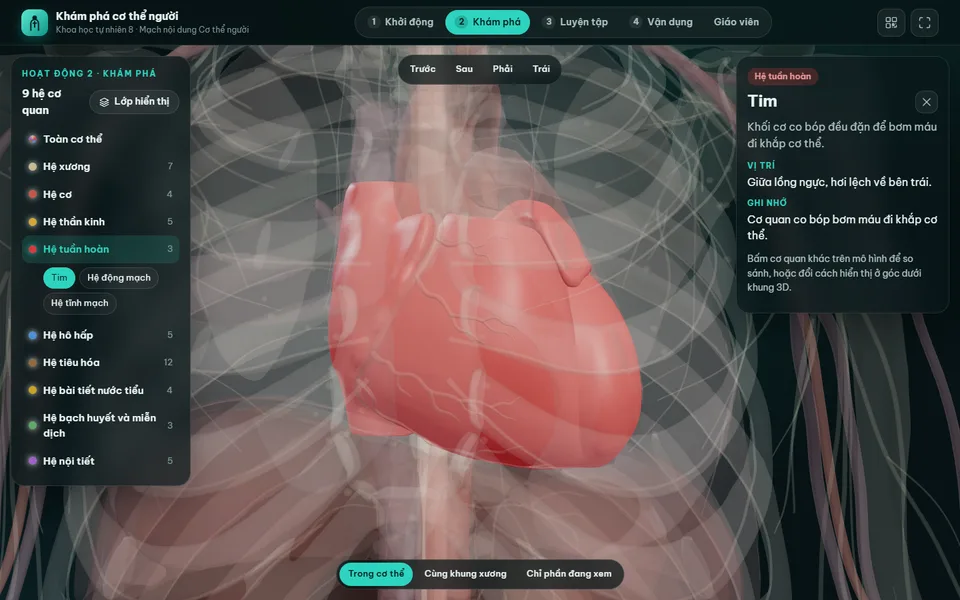 Digital teaching equipment
Sample product
Digital lesson: Explore the human body (3D model)
Try a similar digital product live on a computer or phone. Real products are built around your own idea.
View demo (opens in a new tab)Need a digital contest entry built?
We suggest ideas and suitable formats and work with you to build digital products: 3D exhibitions, 360° tours, simulations, games, AI assistants, websites and QR codes, usually within 3–10 days.
Related articles
See all articlesThemed initiative ideas
Digital product ideas for themed initiative contests: preventing school violence, road safety, drug prevention, environmental protection and youth communication; how to choose a problem, show impact and develop your own idea.
ReadDigital transformation initiatives
Digital transformation initiative ideas for kindergartens, primary and secondary schools and communes; how to find ideas, trial them, present results and use a digital product to make the initiative more convincing.
ReadDigital teaching equipment
What digital teaching equipment is, how it differs from digital learning materials and what forms it takes; examples for preschool, primary grades 1–5, maths, science, English, history and geography, how to use it in class and steps to make a contest entry.
Read