
Guide for school and commune Youth Unions, youth cells and Pioneer units
Digital transformation youth project ideas and Pioneer projects for Youth Union and Pioneer units
Ideas for digital transformation youth projects for schools, communes, wards and youth cells, and Pioneer projects for school-wide and class Pioneer units; how to choose an idea, steps from registration to handover, mobilizing resources and keeping the project alive after launch.
Quick summary
- Youth projects and Pioneer projects are concrete activities that leave a lasting product for the school or locality.
- Digital projects are popular because they last, reach many people, are easy to update and make results easy to record.
- A good idea comes from a real need, fits the unit's capacity and has someone to take it over after handover.
- Linking the project to 26 March, Youth Month or 15 May helps mobilize many members.
What are youth projects and Pioneer projects?
A youth project is a concrete piece of work carried out by the Youth Union or a group of members, with a clear product that serves the common good of a school, agency or locality. A Pioneer project is the familiar name for similar work by the Ho Chi Minh Young Pioneer Organization, carried out by school-wide or class Pioneer units and suited to children.
In the past, projects were often roads, playgrounds, flower gardens or rows of trees. In recent years, many units choose digital transformation youth projects, also called digitization youth projects: digital maps, QR codes, digital heritage rooms and learning games. These products meet the learning, reference and promotion needs of the very place where members live and study.
Why do youth projects matter and why are digital ones popular?
The value of a youth project is not only the product. The process helps members build skills, bond with the group and understand their place better. Digital projects add their own benefits:
Long-lasting and widely viewed
A digital map or digital heritage room is open on phones at any time, serving students, parents, residents and visitors.
Easy to update
Content can grow year by year; each new cohort continues the previous one's work instead of starting over.
Clear results
Views, QR scans and game participants give figures for reporting and presenting the project.
Plays to young people's strengths
Members are used to phones, cameras and social media, so they easily take part in photographing, writing and recording.
Little space needed
Suitable for schools and crowded neighborhoods where building works are hard to do.
How to choose the right youth project idea
Before choosing, the executive committee should answer a few simple questions together:
What does the school or locality need?
Ask teachers, commune or ward officials and residents what is missing: heritage materials, an information channel, digital skills for older people, a learning playground.
Is it within the unit's capacity?
Estimate time, number of participants, what members can do themselves and what needs technical support.
Does it have lasting value?
Prefer projects still used after the launch ceremony, such as digital maps, QR codes or digital libraries, rather than a one-off event.
Who takes it over and maintains it?
Decide in advance on the receiving body, such as the school, the commune or ward committee or the site management board, and who updates the content.
Which occasion does it mark?
Starting or launching on 26 March, during Youth Month or on 15 May gives the project meaning and wider attention.
Youth project ideas for schools
360° tour of the school
360° photos of classrooms, the library, the schoolyard and labs; used for enrollment days and welcoming parents and alumni.
The Youth Union's digital heritage room
School history, generations of teachers and students, achievements and Youth Union activities over the years, viewable on phones.
Digital library corner
QR codes in the library and corridors linking to audiobooks, book reviews and resources selected by students and teachers.
Review games and quizzes
Question sets on history, road safety and life skills used in class meetings and school festivals.
QR codes for trees and school features
Each tree or study corner gets a QR code with information and stories written by students.
Q&A assistant for students
Answers common questions about rules, timetables and Youth Union activities, helping new students settle in quickly.
Youth projects at commune, ward and youth cell level
At commune or ward level, projects should serve residents and promote the locality. At youth cell level, choose a smaller task that can be completed within a few weeks.
Digital map of red addresses
Historic sites, heritage houses and memorials in the area with photos, narration and directions. Many localities already have such digital maps and use them regularly.
QR boards at historic sites
Each site gets a QR board linking to its history, pictures and voice narration.
Youth digital skills team
Helps older people use online public services and pay safely, and spot fake news and online scams.
Page showcasing local products
Photos and stories about craft villages, farm produce and tourist spots, with QR codes at points of sale.
Digitizing the commune's or ward's traditions
Photograph and scan old pictures, local history books and keepsakes, then arrange them into a digital heritage room.
Tasks for youth cells
Each youth cell digitizes one site, one craft village or one residential group, combined into the commune's or ward's shared project.
Pioneer projects for school-wide and class Pioneer units and primary schools
Pioneer projects should be light and safe so children truly take part under the guidance of the Pioneer leader and teachers. Complex technical work is best left to adults or a specialist team.
School-wide unit: digital Pioneer heritage room
Activity photos, outstanding Pioneers and the unit's history; each year class units add their own part.
School-wide unit: virtual tour of where we live
Children choose places and tell their stories; teachers and a technical team shoot 360° photos and build the tour.
Class unit: “I tell a story” audiobook
Each child reads a story about Uncle Ho, young heroes or a folk tale, combined into an audiobook played by QR code.
Class unit: reading corner with QR codes
Each class introduces a few good books through short writing, drawings and audio clips.
Primary school: fun review games
Quizzes on road safety, Pioneer history and lesson content, played on a projector during class meetings.
Steps from registration to handover
Step 1: Register and agree on the idea
The executive committee discusses it, consults the party committee, school or local authority and registers the project with the higher Youth Union or Pioneer level under the annual guidance.
Step 2: Make a short plan
State the goal, product, each cell's tasks, milestones and who is in charge.
Step 3: Collect content
Take photos, take notes, interview people and write narration; check information with knowledgeable people or the managing body.
Step 4: Build the digital product
Members do the simple parts; 360° tours, digital maps and websites can be built with a technical team's help.
Step 5: Test and revise
Invite teachers and residents to try it on phones; fix spelling, links and images before launch.
Step 6: Launch and hand over
Hold a simple launch, hand over admin accounts and show the receiving body how to update it.
Mobilizing resources and maintaining the project after launch
Many digital projects are forgotten soon after launch. For a project to last, plan for resources and maintenance from the start:
Mobilize effort
Members contribute workdays photographing, writing and recording; invite teachers, alumni and local history enthusiasts to join.
Mobilize sponsorship
Businesses, donors and alumni associations may sponsor in cash or in kind, such as QR boards or equipment.
Assign someone to update
Each school year or term has a content owner, with a clear handover when the committee changes.
Check regularly
Each term, test QR codes, check links and add new photos and stories.
Build it into regular activities
Use the project in class meetings, flag ceremonies and when welcoming guests so many people know and use it.
Recording and presenting the project's results
Usage figures
Views, QR scans, game participants and the number of older people helped.
Pictures of the process
Photos and short videos of members surveying, photographing, recording and launching.
Beneficiaries' feedback
What teachers, residents and visitors say about how useful the project is.
A short presentation
One page summarizing the idea, approach and results for reporting and sharing with other units.
Frequently asked questions
What does a digital transformation youth project include?
Usually a digital product serving the community, such as a digital map of red addresses, QR boards at historic sites, a digital heritage room, a 360° tour, a digital library, learning games, or digital skills support for residents.
Can a small youth cell run a digitization project?
Yes. A youth cell can take on a manageable task such as digitizing one site, building a reading corner with QR codes or a quiz set, then add it to the higher unit's shared project.
What Pioneer project suits a primary school?
Choose light, safe work where children tell stories, draw and read, such as an “I tell a story” audiobook, a reading corner with QR codes or review games. Adults handle the technical side.
How long does a digital youth project take?
It depends on scale. Collecting content usually takes the longest; building digital products such as QR codes, an introduction page or a 360° tour can be done in a few days once the content is ready.
Who updates the project after handover?
Agree on this at the start: usually the school or commune Youth Union, or the receiving body such as the school or the site management board. The product should have a simple admin page for self-updating.
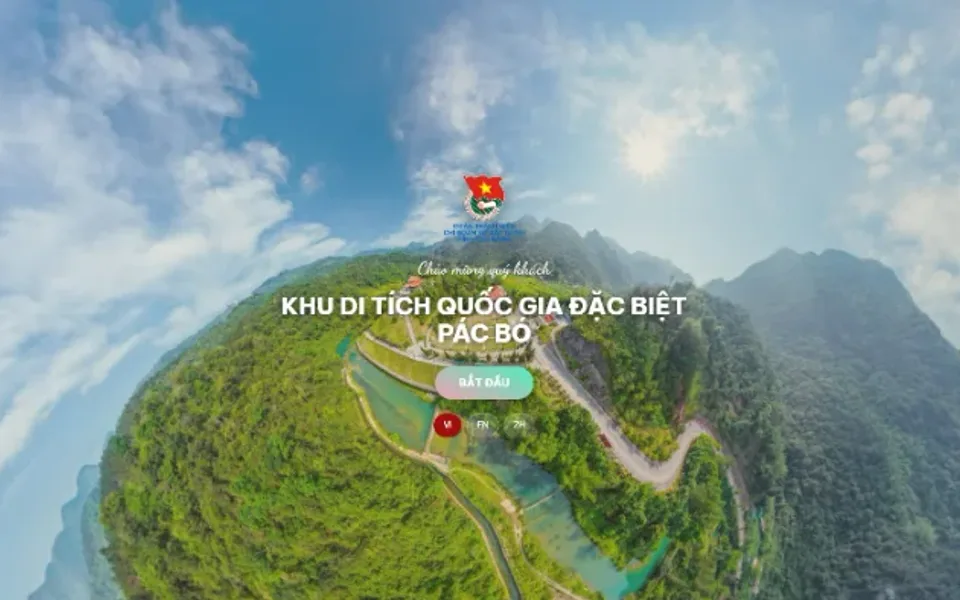 Youth project
Sample product
Digitization of the Pac Bo special national relic site
Try a similar digital product live on a computer or phone. Real products are built around your own idea.
View demo (opens in a new tab)Need ideas and digital products for a youth project or Pioneer project?
We suggest ideas suited to your unit and work with you to build the digital products: digital maps, 360° tours, digital heritage rooms, QR codes, games and audiobooks. Usually within 3–10 days once the content is ready.
Related articles
See all articlesHeritage digitization, red addresses
What heritage digitization is, its forms and why it matters for education and tourism; how to build a digital map of red addresses, 360° virtual tours, QR codes and audio guides step by step, and how to use digital heritage in lessons and Youth Union and Pioneer activities.
Read80 years of War Invalids and Martyrs Day
Ideas for gratitude activities marking the 80th anniversary of War Invalids and Martyrs Day for schools, Youth Unions, communes, wards and veterans' associations: traditional activities, lasting digital activities, respectful handling of martyrs' names and photos, and milestones before 27 July 2027.
ReadModels for following Uncle Ho
More than 15 model name ideas for schools, neighborhoods, agencies and youth unions; how to choose, name, run and record results, and ways to use digital technology to make models lively and widely shared.
Read