
Guide for schools, Youth Union and Pioneers
What does a school heritage room include? How to build a digital heritage room
The role of a school heritage room, what it includes, steps to build it and collect materials, decoration ideas for primary and secondary schools, and how to bring it online with 3D, 360° and QR codes.
Quick summary
- A heritage room keeps the school's history, people and achievements to teach students about its traditions.
- It usually has six groups: founding history, teachers over the years, outstanding students, achievements, artifacts and a Youth Union/Pioneer corner.
- Alumni and former teachers are the most valuable source of materials; collect early and record where each item came from.
- A digital heritage room (3D, 360°, QR codes) is open at any time, easy to update and lets distant alumni visit too.
What role does a school heritage room play?
A school heritage room tells the school's story: how it began, the stages it went through, and the generations of teachers and students who made it what it is today.
A good heritage room is not just for visitors. It is where students come to understand and take pride in their school, and find more motivation to study and grow.
Teaching traditions
Students learn the school's history and the examples set by teachers and older students.
Connecting generations
Alumni and former teachers revisit memories, contribute materials and keep supporting the school.
Introducing the school
Parents, guests and inspection teams quickly understand the school's development and strengths.
A venue for Youth Union and Pioneer activities
Induction ceremonies, themed meetings and local history lessons can be held right there.
What does a school heritage room include?
There is no single template for every school. Most heritage rooms are arranged around these six groups of content:
1. Founding and development history
A timeline from the founding day to now, with renamings, new buildings and expansions, plus archive photos of each period.
2. Teachers and leaders over the years
Photos and a few lines about each generation of school leaders, long-serving teachers and people who made special contributions.
3. Outstanding students and successful alumni
Top students, students who overcame hardship and alumni who succeeded in many fields, told as short stories rather than lists of names.
4. The school's achievements
Certificates of merit, emulation flags, cups and awards, arranged by time or by field.
5. Artifacts and keepsakes
Old grade books, past uniforms, the school drum, class photos, handwritten letters; each item should have a label with its origin and story.
6. Youth Union and Pioneer corner
The history of the school's Youth Union and Pioneer activities, flags, red scarves, campaign photos, Pioneer projects and outstanding members.
How to build a school heritage room: 6 steps
Step 1: Form a working group
Include school leaders, a history teacher, the Pioneer leader or Youth Union secretary, and a few enthusiastic alumni.
Step 2: Choose a theme and layout
Agree on one overall message, for example “A journey of … years”, then divide the room into zones for the six content groups.
Step 3: Collect materials and artifacts
Search the school archives, ask former teachers and invite alumni to send photos, keepsakes and stories.
Step 4: Select and verify information
Check dates, names and events with several people; display only what is certain.
Step 5: Design and set up the display
Draw a floor plan, choose a main color, prepare boards, shelves and display cases; print photos large enough and text easy to read.
Step 6: Open the room and put it to use
Link the opening to a meaningful occasion, assign a caretaker and plan activities from the start.
Collecting materials from alumni and former teachers
Old photos, keepsakes and memories from alumni are often the most precious part of a heritage room, and the easiest to lose if not collected early.
Reach out widely
Post an invitation on the school's page and alumni groups, and ask each class's contact person to pass it on.
Say clearly what you need
Class photos, activity photos, certificates, letters, old school supplies; with the year, class and names of people in the photo if remembered.
Take copies, return originals
Many people want to keep their keepsakes; the school can photograph or scan them and give them back, keeping items only when the donor agrees.
Record the stories
Hold short interviews with former teachers and early alumni; record audio or video for the digital part as well.
Credit contributors
Put the contributor's name next to each item; this also encourages more people to take part.
Decorating a primary school heritage room and Pioneer room
Bright, friendly colors
Use bright colors, illustrations and large text; avoid too much text and dry tables.
A picture timeline
Each milestone is one large photo with one short sentence so children remember it easily.
A prominent Pioneer corner
The Pioneer flag, red scarves and photos of the school's recycling drives, piggy-bank campaigns and Pioneer projects.
Students' own work
Drawings of the school, writing and handicrafts, changed each school year to keep the room fresh.
At children's eye level
Hang photos and place artifact shelves at a height young students can see; leave space for a whole class to stand and listen.
Designing a heritage room for lower and upper secondary schools
A layout that follows the journey
Visitors walk through time from the founding day to today, ending in a zone about the future.
Stories instead of lists
Each student or teacher featured has a photo, a short story and a memorable quote.
Youth Union corner
The history of the school's Youth Union, volunteer campaigns, social activities and outstanding members.
Interactive zone
A touch screen, QR codes and a guest book for students and visitors to leave their thoughts.
Students take part
History, media and art clubs help collect materials, design the room and guide visitors.
What is a digital or virtual heritage room?
A digital heritage room (also called a virtual, online or 3D heritage room) is a version of the room in the digital space, viewable on phones, computers and VR headsets.
The digital part can accompany a physical room or replace it when the school lacks space. Some schools have done this, such as the 3D/VR360 heritage room of THPT Chuyên Lê Quý Đôn and the digital museum of The Olympia Schools.
3D exhibition room
A virtual space to walk through and view photos, artifacts and videos as in a real room; opened by link, no installation needed.
360° tour
360° shots of the heritage room and campus with hotspots that show information, ideal for introducing the school remotely.
QR codes beside artifacts
Scan a code next to an artifact to hear its story, watch interview videos or see archive photos that have no display space.
Online timeline
The school's history year by year with photos and stories, easy to extend when new materials arrive.
Alumni contributions
An online form for distant alumni to send photos and memories; the school reviews them before publishing.
Voice narration
Audiobooks and audio guides for each zone let students explore on their own without a guide.
Keeping the heritage room alive
Schedule activities
Every class visits at least once a year, linked to the school's anniversary, opening ceremony and Pioneer or Youth Union meetings.
Students as guides
Train a team of young guides to show the room to visitors and younger classes.
Update every school year
Add new achievements, outstanding students and activity photos to both the physical room and the digital part.
Check the digital part regularly
Test QR codes, links and videos, especially before major events.
Record visits
A visitor book and online view statistics show how much the heritage room is used.
Common mistakes when building a heritage room
Displaying only certificates
A room full of flags and cups but few human stories feels distant to students.
Unverified information
Wrong dates or names in photos easily upset alumni and former teachers.
Small text, blurry photos
Old photos enlarged too much look pixelated, and small print is hard to read from a distance.
Locked after opening
The room opens only for guests, has no caretaker and is never updated.
Frequently asked questions
What does a school heritage room include?
Usually the founding history, teachers and leaders over the years, outstanding students and alumni, achievements, artifacts and keepsakes, and a Youth Union/Pioneer corner. Each school arranges them to fit its own history.
How can a school without a spare room make a heritage room?
Create a small heritage corner in the lobby or library, combined with a digital heritage room using a 3D exhibition, an online timeline and QR codes for materials that do not fit on display.
How is a virtual heritage room different from a physical one?
A virtual room can be viewed any time on a phone, holds many photos, videos and stories, and is easy to update. A physical room offers direct contact with artifacts. The two complement each other very well.
What should a primary school Pioneer heritage room have?
The Pioneer flag, red scarves, campaign photos, Pioneer projects, outstanding Pioneers and the children's own work, presented with bright colors, many pictures and little text.
How can alumni contribute materials to the heritage room?
Post a call through alumni groups, say clearly what kinds of materials are needed, accept photos or scans and credit contributors. An online submission form lets people far away take part too.
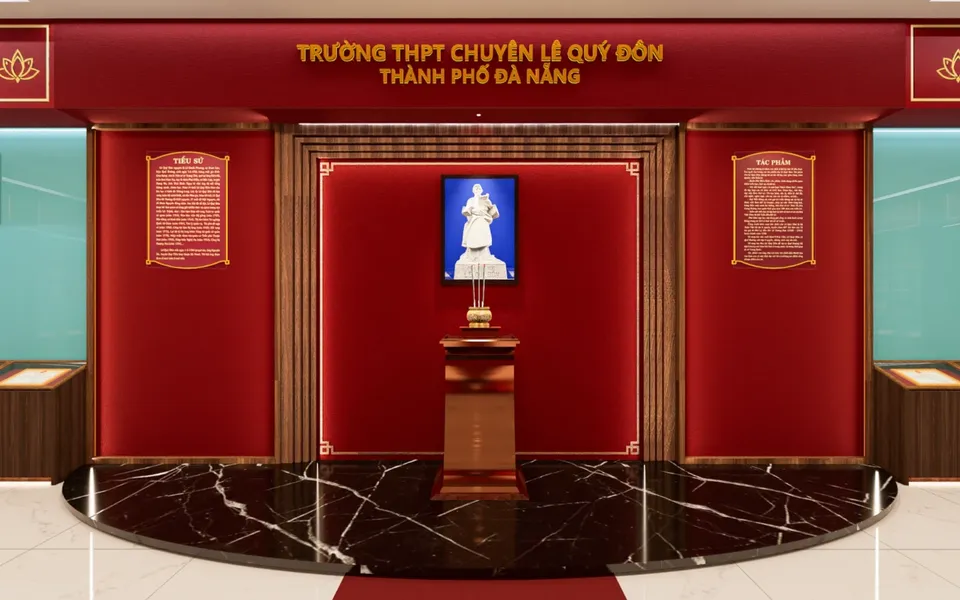 Heritage room
Sample product
Le Quy Don High School for the Gifted 3D/VR360 heritage room
Try a similar digital product live on a computer or phone. Real products are built around your own idea.
View demo (opens in a new tab)Need a digital heritage room for your school?
We suggest ideas and work with you to build digital products: 3D heritage rooms, 360° tours, online timelines, videos, audiobooks and QR codes, usually within 3–10 days.
Related articles
See all articlesSchool anniversary
Tips for planning a school anniversary, activity ideas, digital yearbooks linked to print by QR codes, virtual heritage rooms, meaningful gifts, collecting photos from alumni and promoting the event on social media.
ReadVirtual museums in teaching
What virtual museums and exhibitions are, their types and benefits for teaching history, geography, literature, the arts and STEM; steps to make a 3D virtual museum, free tools, lesson ideas and how to let students create their own exhibitions.
ReadHo Chi Minh Cultural Space
Which items make up a Ho Chi Minh Cultural Space, the steps to build one in schools, kindergartens, neighborhoods and agencies, how to take it online with QR codes, online bookshelves and 3D exhibitions, and how to present it convincingly.
Read